Tutorial 6 of 6
Build a palette and check every color pairing
Beginner 7 min
Generate HSL harmonies, lock your favorite colors, extract a photo palette, check contrast and export colors for web and pixel-art projects.
Open Palette Studio
Choose Palette Studio on Lumina's editing rail or in the Tools panel. You can also start from one of the four palette examples on the landing page, or choose Palette examples inside the studio. Palette Studio keeps its own collection, separate from your photo edits, and reopens your most recent collection.
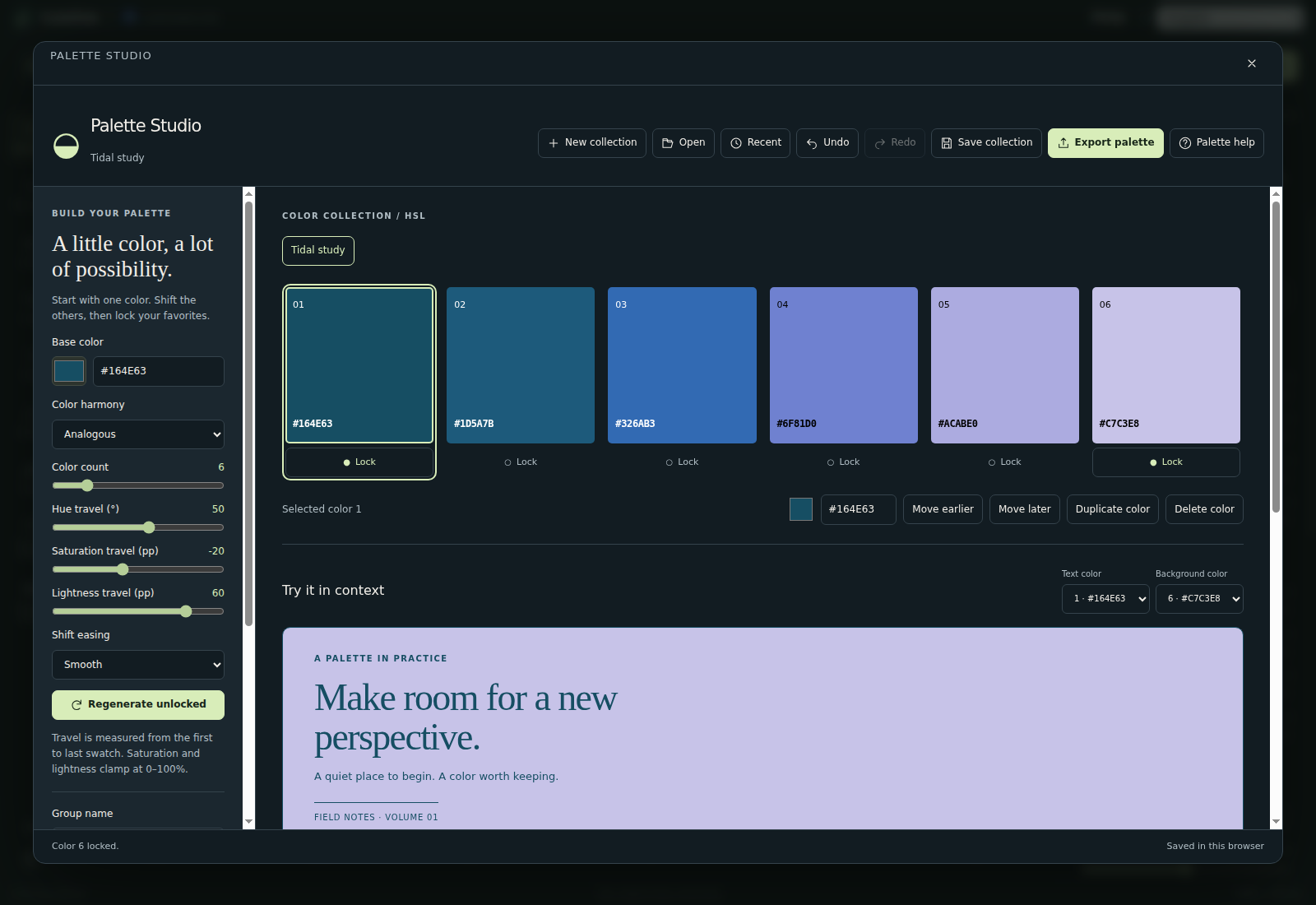
Generate a color family
Set the Base color with the color picker or type a six-digit HEX value such as #164E63 (the # is optional). Then choose a Color harmony. Monochromatic keeps one hue. Analogous follows your hue travel. Complementary, split complementary, triadic and tetradic repeat familiar hue offsets around the HSL color wheel.
Color count sets 2–24 colors. Hue travel (°) is measured in degrees; Saturation travel (pp) and Lightness travel (pp) are percentage points from the first to the last swatch. Shift easing (Linear, Ease in, Ease out or Smooth) controls how that travel is distributed. HSL spacing is numerical, so equally spaced steps may not look equally different.
Select a swatch to edit it with the color picker or its HEX field. Lock keeps a swatch when the generator controls change. Regenerate unlocked applies the current settings again; it is deterministic, so unchanged settings produce the same colors. Move earlier, Move later, Duplicate color and Delete color refine the order. Undo and Redo (Ctrl+Z, Ctrl+Shift+Z or Ctrl+Y) keep up to 60 changes.
Clone group makes an independent variation; the group buttons above the swatches switch between them. A collection holds up to five groups, each with up to 24 colors. Exports use the active group.
Start with a photo
From current photo samples Lumina's edited image, including the current crop and text. From image file accepts a local PNG, JPEG or WebP up to 12 MB and 16 megapixels. Neither action uploads the source image.
Extraction samples a preview with a longest edge of 400 pixels, groups nearby RGB colors and prefers frequent, distinct clusters. Pixels below 50% opacity are ignored. A simple image may yield fewer colors than requested. Importing colors replaces the active group's colors and clears its locks; Undo restores the previous colors.
Paste palette and Open also accept a HEX list, a GIMP GPL or JASC-PAL file, or the CSS variables and SVG swatches that Palette Studio exports. Use six-digit opaque HEX colors; alpha and other CSS color expressions are not accepted.
Check the pairings
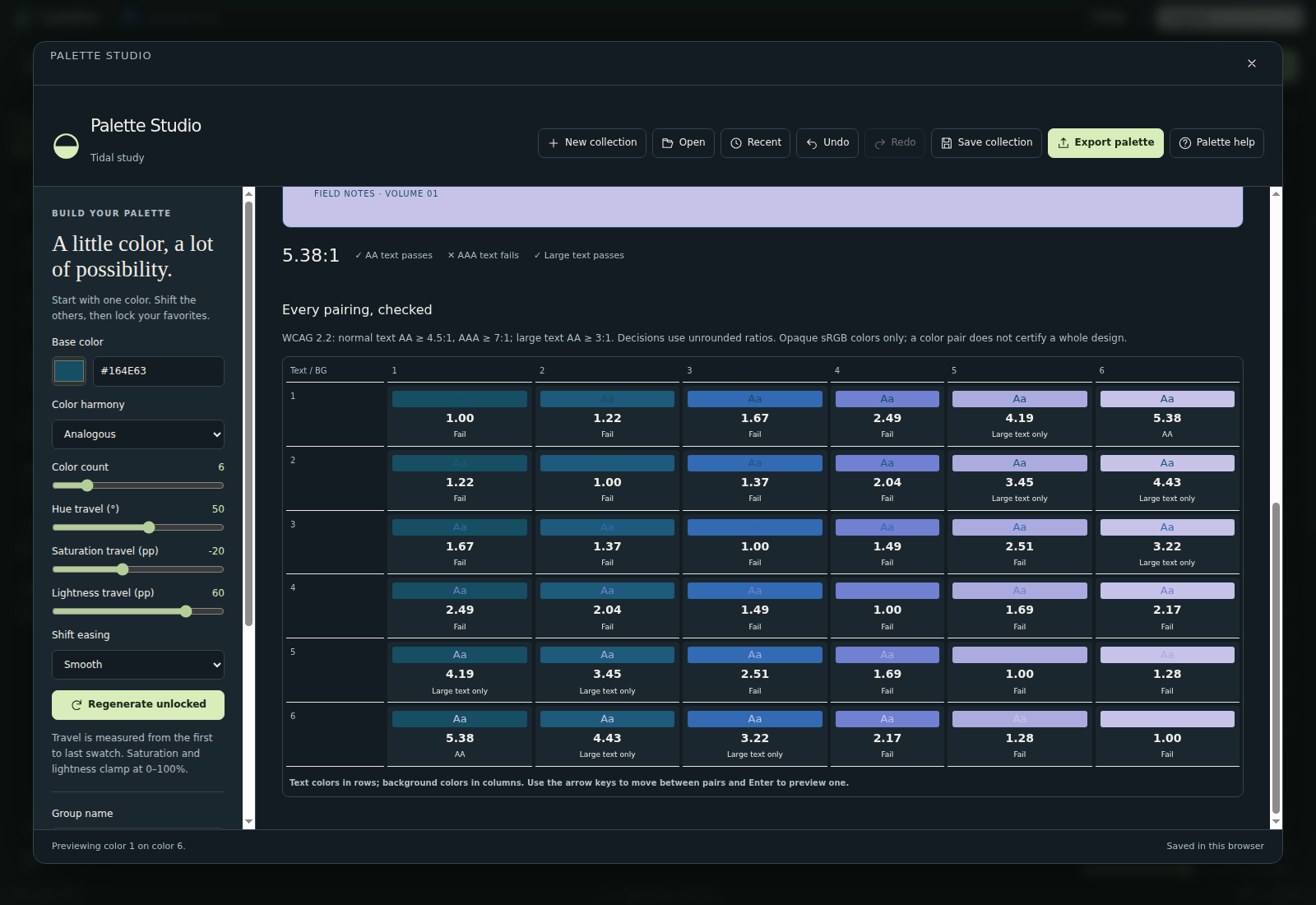
Under Try it in context, choose a Text color and a Background color for the sample design. The readout shows the ratio and whether normal text passes AA and AAA and whether large text passes AA.
Every pairing, checked lists all foreground/background combinations: rows are text colors and columns are backgrounds. Select a cell to preview that pair. With the keyboard, Tab into the matrix once, move with the arrow keys, Home and End, and press Enter.
Normal text requires at least 4.5:1 for WCAG AA and 7:1 for AAA. Large text needs 3:1 for AA; large means at least 18 pt regular or 14 pt bold. Decisions use the exact ratio even though the labels show two decimals. A color-pair result does not certify a complete design or text over a varying photo.
Keep, share and reuse the collection
After your first change, the collection is stored in this browser; Recent lists the last eight collections and lets you remove one. Save collection (Ctrl+S) downloads a .lumina-palette.json file with every group, setting and lock. Open it here or with Lumina's main Open button. Download a file for durable storage, because clearing browser data removes local copies. Lumina's Google Drive controls save photo projects, not these collections.
Export palette offers a HEX list, CSS variables, GIMP GPL, JASC-PAL, SVG swatches, a labeled PNG color sheet, Copy share link and Print / save PDF. A share link contains the whole collection, so whoever opens it gets their own editable copy. GPL and JASC-PAL files import into Flipline's Pixel Studio and Retro Lab. All exports use opaque sRGB. The collection format is documented in the palette schema.
The companion Color Harmony & Shift Generator and Palette Contrast Matrix tools use the same engine through HTML forms, the JSON API and MCP. The contrast tool also offers a CSV report.
Ready to try it?